.
.
Saving Image Data In SharedPreferences
Using Android Studio 1.4
It is possible to store image in SharedPreferences byconverting it into Base64 string.
|
1) Start Up
Follow previous tutorial or download start up project MyProfile3-first-login.zip.
2) Edit Manifest
<?xml version="1.0" encoding="utf-8"?>
<manifest xmlns:android="http://schemas.android.com/apk/res/android"
package="com.notarazi.myprofile" >
<uses-feature android:name="android.hardware.camera"
android:required="false" />
<uses-permission android:name="android.permission.CAMERA" />
<uses-permission android:name="android.permission.WRITE_EXTERNAL_STORAGE" />
<application
android:allowBackup="true"
android:icon="@mipmap/ic_launcher"
android:label="@string/app_name"
android:supportsRtl="true"
android:theme="@style/AppTheme" >
<activity android:name=".MyProfile"
android:configChanges="keyboardHidden|orientation|screenSize">
<intent-filter>
<action android:name="android.intent.action.MAIN" />
<category android:name="android.intent.category.LAUNCHER" />
</intent-filter>
</activity>
</application>
</manifest>
|
Get permission to use Camera and Gallery resource.
Prevent the application from resetting the image view when device orientation changes.
3) Edit Layout
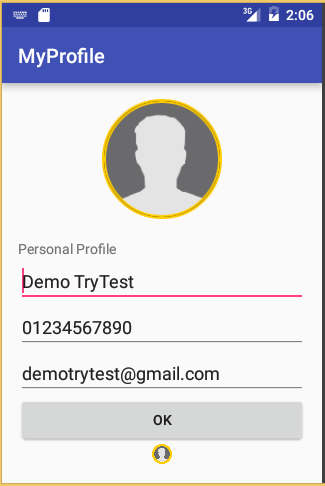
Add a method call (setProfilePhoto) and another Image View (usersavedphoto).
The second Image View (usersavedphoto) is used to check that the image has been successfully encoded/decoded to/from Base64 string.
<?xml version="1.0" encoding="utf-8"?>
<RelativeLayout xmlns:android="http://schemas.android.com/apk/res/android"
xmlns:tools="http://schemas.android.com/tools"
xmlns:app="http://schemas.android.com/apk/res-auto"
android:layout_width="match_parent"
android:layout_height="match_parent"
android:paddingLeft="@dimen/activity_horizontal_margin"
android:paddingRight="@dimen/activity_horizontal_margin"
android:paddingTop="@dimen/activity_vertical_margin"
android:paddingBottom="@dimen/activity_vertical_margin"
tools:context=".MyProfile">
<ScrollView xmlns:android="http://schemas.android.com/apk/res/android"
xmlns:tools="http://schemas.android.com/tools"
android:layout_width="match_parent"
android:layout_height="match_parent"
android:orientation="vertical" >
<LinearLayout
android:layout_width="match_parent"
android:layout_height="match_parent"
android:orientation="vertical" >
<com.joooonho.SelectableRoundedImageView
android:id="@+id/userphoto"
android:layout_width="120dp"
android:layout_height="120dp"
android:layout_gravity="center"
android:scaleType="centerCrop"
android:src="@drawable/photo"
app:sriv_border_color="#FFCC00"
app:sriv_border_width="2dp"
app:sriv_oval="true" />
<TextView
android:layout_width="match_parent"
android:layout_height="match_parent"
android:layout_marginTop="20dp"
android:text="Personal Profile"/>
<EditText
android:id="@+id/username"
android:layout_width="match_parent"
android:layout_height="match_parent"
android:inputType="text"
android:hint="Name"/>
<EditText
android:id="@+id/userphone"
android:layout_width="match_parent"
android:layout_height="match_parent"
android:inputType="phone"
android:hint="Phone number"/>
<EditText
android:id="@+id/useremail"
android:layout_width="match_parent"
android:layout_height="match_parent"
android:inputType="textEmailAddress"
android:hint="Email"/>
<Button
android:layout_width="match_parent"
android:layout_height="match_parent"
android:text="OK"
android:onClick="setProfilePhoto"
/>
<com.joooonho.SelectableRoundedImageView
android:id="@+id/usersavedphoto"
android:layout_width="20dp"
android:layout_height="20dp"
android:layout_gravity="center"
android:scaleType="centerCrop"
android:src="@android:drawable/ic_menu_gallery"
app:sriv_border_color="#FFCC00"
app:sriv_border_width="2dp"
app:sriv_oval="true" />
</LinearLayout>
</ScrollView>
</RelativeLayout>
|
4) Edit MainActivity (convert image)
Bind imageview object to imageview ui.
Get bitmap from the imageview object.
Convert bitmap to string
Save string to sharedpreferences
package com.notarazi.myprofile;
import android.content.SharedPreferences;
import android.graphics.Bitmap;
import android.graphics.BitmapFactory;
import android.os.Bundle;
import android.support.v7.app.AppCompatActivity;
import android.util.Base64;
import android.view.View;
import android.widget.EditText;
import android.widget.ImageView;
import java.io.ByteArrayOutputStream;
public class MyProfile extends AppCompatActivity {
@Override
protected void onCreate(Bundle savedInstanceState) {
super.onCreate(savedInstanceState);
setContentView(R.layout.activity_my_profile);
checkFirstLogin();
prepareForm();
}
private void prepareForm() {
SharedPreferences preferences = getSharedPreferences("myprefs",MODE_PRIVATE);
EditText etUserName=(EditText)findViewById(R.id.username);
EditText etUserPhone=(EditText)findViewById(R.id.userphone);
EditText etUserEmail=(EditText)findViewById(R.id.useremail);
// If value for key not exist then return second param value - In this case "..."
etUserName.setText(preferences.getString("username", "..."));
etUserPhone.setText(preferences.getString("userphone", "..."));
etUserEmail.setText(preferences.getString("useremail", "..."));
}
private void checkFirstLogin() {
SharedPreferences preferences = getSharedPreferences("myprefs",MODE_PRIVATE);
// If value for key not exist then return second param value - In this case true
if (preferences.getBoolean("firstLogin", true)) {
initProfile();
SharedPreferences.Editor editor = preferences.edit();
editor.putBoolean("firstLogin", false);
editor.commit();
}
}
private void initProfile() {
SharedPreferences preferences = getSharedPreferences("myprefs",MODE_PRIVATE);
SharedPreferences.Editor editor = preferences.edit();
editor.putString("username","Demo TryTest");
editor.putString("userphone","01234567890");
editor.putString("useremail","demotrytest@gmail.com");
editor.commit();
}
public void setProfilePhoto(View view){
ImageView ivphoto = (ImageView)findViewById(R.id.userphoto);
//code image to string
ivphoto.buildDrawingCache();
Bitmap bitmap = ivphoto.getDrawingCache();
ByteArrayOutputStream stream=new ByteArrayOutputStream();
bitmap.compress(Bitmap.CompressFormat.PNG, 90, stream);
byte[] image=stream.toByteArray();
//System.out.println("byte array:"+image);
//final String img_str = "data:image/png;base64,"+ Base64.encodeToString(image, 0);
//System.out.println("string:"+img_str);
String img_str = Base64.encodeToString(image, 0);
//decode string to image
String base=img_str;
byte[] imageAsBytes = Base64.decode(base.getBytes(), Base64.DEFAULT);
ImageView ivsavedphoto = (ImageView)this.findViewById(R.id.usersavedphoto);
ivsavedphoto.setImageBitmap(BitmapFactory.decodeByteArray(imageAsBytes,0, imageAsBytes.length)
);
}
}
|


5) Edit MainActivity (save image in sharedpreferences)
package com.notarazi.myprofile;
import android.content.SharedPreferences;
import android.graphics.Bitmap;
import android.graphics.BitmapFactory;
import android.os.Bundle;
import android.support.v7.app.AppCompatActivity;
import android.util.Base64;
import android.view.View;
import android.widget.EditText;
import android.widget.ImageView;
import java.io.ByteArrayOutputStream;
public class MyProfile extends AppCompatActivity {
@Override
protected void onCreate(Bundle savedInstanceState) {
super.onCreate(savedInstanceState);
setContentView(R.layout.activity_my_profile);
checkFirstLogin();
prepareForm();
}
private void prepareForm() {
SharedPreferences preferences = getSharedPreferences("myprefs",MODE_PRIVATE);
EditText etUserName=(EditText)findViewById(R.id.username);
EditText etUserPhone=(EditText)findViewById(R.id.userphone);
EditText etUserEmail=(EditText)findViewById(R.id.useremail);
// If value for key not exist then return second param value - In this case "..."
etUserName.setText(preferences.getString("username", "..."));
etUserPhone.setText(preferences.getString("userphone", "..."));
etUserEmail.setText(preferences.getString("useremail", "..."));
}
private void checkFirstLogin() {
SharedPreferences preferences = getSharedPreferences("myprefs",MODE_PRIVATE);
// If value for key not exist then return second param value - In this case true
if (preferences.getBoolean("firstLogin", true)) {
initProfile();
SharedPreferences.Editor editor = preferences.edit();
editor.putBoolean("firstLogin", false);
editor.commit();
}
}
private void initProfile() {
SharedPreferences preferences = getSharedPreferences("myprefs",MODE_PRIVATE);
SharedPreferences.Editor editor = preferences.edit();
editor.putString("username","Demo TryTest");
editor.putString("userphone","01234567890");
editor.putString("useremail","demotrytest@gmail.com");
editor.commit();
}
public void setProfileImage(View view){
ImageView ivphoto = (ImageView)findViewById(R.id.userphoto);
//code image to string
ivphoto.buildDrawingCache();
Bitmap bitmap = ivphoto.getDrawingCache();
ByteArrayOutputStream stream=new ByteArrayOutputStream();
bitmap.compress(Bitmap.CompressFormat.PNG, 90, stream);
byte[] image=stream.toByteArray();
//System.out.println("byte array:"+image);
//final String img_str = "data:image/png;base64,"+ Base64.encodeToString(image, 0);
//System.out.println("string:"+img_str);
String img_str = Base64.encodeToString(image, 0);
//decode string to image
String base=img_str;
byte[] imageAsBytes = Base64.decode(base.getBytes(), Base64.DEFAULT);
ImageView ivsavedphoto = (ImageView)this.findViewById(R.id.usersavedphoto);
ivsavedphoto.setImageBitmap(BitmapFactory.decodeByteArray(imageAsBytes,0, imageAsBytes.length) );
//save in sharedpreferences
SharedPreferences preferences = getSharedPreferences("myprefs",MODE_PRIVATE);
SharedPreferences.Editor editor = preferences.edit();
editor.putString("userphoto",img_str);
editor.commit();
}
}
|
6) Edit MainActivity (initialize Image Views with the stored image)
package com.notarazi.myprofile;
import android.content.SharedPreferences;
import android.graphics.Bitmap;
import android.graphics.BitmapFactory;
import android.os.Bundle;
import android.support.v7.app.AppCompatActivity;
import android.util.Base64;
import android.view.View;
import android.widget.EditText;
import android.widget.ImageView;
import java.io.ByteArrayOutputStream;
public class MyProfile extends AppCompatActivity {
@Override
protected void onCreate(Bundle savedInstanceState) {
super.onCreate(savedInstanceState);
setContentView(R.layout.activity_my_profile);
checkFirstLogin();
prepareForm();
}
private void prepareForm() {
SharedPreferences preferences = getSharedPreferences("myprefs",MODE_PRIVATE);
EditText etUserName=(EditText)findViewById(R.id.username);
EditText etUserPhone=(EditText)findViewById(R.id.userphone);
EditText etUserEmail=(EditText)findViewById(R.id.useremail);
ImageView ivUserPhoto=(ImageView) findViewById(R.id.userphoto);
ImageView ivUserSavedPhoto=(ImageView) findViewById(R.id.usersavedphoto);
// If value for key not exist then return second param value - In this case "..."
etUserName.setText(preferences.getString("username", "..."));
etUserPhone.setText(preferences.getString("userphone", "..."));
etUserEmail.setText(preferences.getString("useremail", "..."));
String img_str=preferences.getString("userphoto", "");
if (!img_str.equals("")){
//decode string to image
String base=img_str;
byte[] imageAsBytes = Base64.decode(base.getBytes(), Base64.DEFAULT); ivUserPhoto.setImageBitmap(BitmapFactory.decodeByteArray(imageAsBytes, 0, imageAsBytes.length) ); ivUserSavedPhoto.setImageBitmap(BitmapFactory.decodeByteArray(imageAsBytes, 0, imageAsBytes.length) );
}
}
private void checkFirstLogin() {
SharedPreferences preferences = getSharedPreferences("myprefs",MODE_PRIVATE);
// If value for key not exist then return second param value - In this case true
if (preferences.getBoolean("firstLogin", true)) {
initProfile();
SharedPreferences.Editor editor = preferences.edit();
editor.putBoolean("firstLogin", false);
editor.commit();
}
}
private void initProfile() {
SharedPreferences preferences = getSharedPreferences("myprefs",MODE_PRIVATE);
SharedPreferences.Editor editor = preferences.edit();
editor.putString("username","Demo TryTest");
editor.putString("userphone","01234567890");
editor.putString("useremail","demotrytest@gmail.com");
editor.commit();
}
public void setProfileImage(View view){
ImageView ivphoto = (ImageView)findViewById(R.id.userphoto);
//code image to string
ivphoto.buildDrawingCache();
Bitmap bitmap = ivphoto.getDrawingCache();
ByteArrayOutputStream stream=new ByteArrayOutputStream();
bitmap.compress(Bitmap.CompressFormat.PNG, 90, stream);
byte[] image=stream.toByteArray();
//System.out.println("byte array:"+image);
//final String img_str = "data:image/png;base64,"+ Base64.encodeToString(image, 0);
//System.out.println("string:"+img_str);
String img_str = Base64.encodeToString(image, 0);
//decode string to image
String base=img_str;
byte[] imageAsBytes = Base64.decode(base.getBytes(), Base64.DEFAULT);
ImageView ivsavedphoto = (ImageView)this.findViewById(R.id.usersavedphoto);
ivsavedphoto.setImageBitmap(BitmapFactory.decodeByteArray(imageAsBytes,0, imageAsBytes.length) );
//save in sharedpreferences
SharedPreferences preferences = getSharedPreferences("myprefs",MODE_PRIVATE);
SharedPreferences.Editor editor = preferences.edit();
editor.putString("userphoto",img_str);
editor.commit();
}
}
|
OUTCOME.
(If there is a profile photo stored in shared preferences, the small image below the button will display it. Otherwise it will display a gallery icon as in step no.3).

download link is not working
ReplyDeleteDear download link is working properly, check again
Deletenice tuturial thank u so much
ReplyDeleteDoes it saves the image from Gallery as well?? It does not look like it saves the image from Gallery.
ReplyDeleteAb Initio training helps learners develop practical skills in enterprise ETL, data integration, and large-scale data processing. This ab initio training covers graph development, data transformation, metadata management, debugging, and performance optimization. Students gain hands-on experience through real-time projects and practical assignments.
ReplyDeleteHelpful article! Choosing the right Software Training Institute in Hyderabad can support skill development and career growth.https://fugenacademy.com/
ReplyDelete