Sunday, March 1, 2015

103 MySuperHero Android Add Edit Delete ListView Item


.
103 MySuperHero Android Add Edit Delete ListView Item
Users typically would want to be able to modify their list of heroes such as adding new heroes and edit or delete the existing ones.

0) Starting Up

Continue from the previous tutorial or download startup files.

1) Add Item

File: SuperHeroesActivity.java
package com.example.mysuperhero;
import java.util.ArrayList;
import java.util.Arrays;
import java.util.List;
import android.os.Bundle;
import android.app.Activity;
import android.view.Menu;
import android.view.View;
import android.view.View.OnClickListener;
import android.widget.AdapterView;
import android.widget.ArrayAdapter;
import android.widget.Button;
import android.widget.ListView;
import android.widget.TextView;
import android.widget.Toast;
public class SuperHeroesActivity extends Activity {
        Button btnAddSuperHero;
        ListView lvwSuperHeroes;
        String[] strSuperHeroes;
        ArrayAdapter adpSuperHeroes;
        
        @Override
        protected void onCreate(Bundle savedInstanceState) {
                super.onCreate(savedInstanceState);
                setContentView(R.layout.activity_super_heroes);
                setLvwSuperHeroes();
                setBtnAddSuperHero();
        }
        @Override
        public boolean onCreateOptionsMenu(Menu menu) {
                // Inflate the menu; this adds items to the action bar if it is present.
                getMenuInflater().inflate(R.menu.activity_super_heroes, menu);
                return true;
        }
         private void setLvwSuperHeroes(){
                 //bind object
        lvwSuperHeroes = (ListView) findViewById(R.id.lvw_superheroes);
               
        //Add new values to array
        strSuperHeroes =new String[] {"Superman","Spiderman","Batman","Ironman","Ultraman", "Pacman", "Roboman"};
               
        //Create ArrayList from strSuperHeroes
        List<String> values = new ArrayList<String>(Arrays.asList(strSuperHeroes));
               
        //Create Adapter to load ArrayList
        adpSuperHeroes = new ArrayAdapter<String>(this, android.R.layout.simple_list_item_1, values);
               
        //Plug adpSuperHeroes to lvwSUperHeroes
        lvwSuperHeroes.setAdapter(adpSuperHeroes);
               
        //set onclick listener for listview
        lvwSuperHeroes.setOnItemClickListener(new AdapterView.OnItemClickListener() {
            @Override
            public void onItemClick(AdapterView<?> parent, View view, int position, long id) {
                editSuperHero(position, ((TextView) view).getText().toString());
            }
                });
            }
                private void setBtnAddSuperHero() {
                        btnAddSuperHero = (Button) findViewById(R.id.btn_add_superhero);
                        btnAddSuperHero.setOnClickListener(new OnClickListener() {
                                @Override
                                public void onClick(View view) {
                                        addSuperHero();
                                }
                        });
                }
                private void editSuperHero(int position, String text){
                Toast.makeText(getApplicationContext(),"Edit SuperHero.\nPosition:"+position+"\nText:"+text+"\n",
                        Toast.LENGTH_SHORT).show();        
            }
            private void addSuperHero(){
                Toast.makeText(getApplicationContext(),"Add SuperHero.",
                        Toast.LENGTH_SHORT).show();  
                adpSuperHeroes.add("New Hero");
                adpSuperHeroes.notifyDataSetChanged();
                //scroll to the bottom
                lvwSuperHeroes.smoothScrollToPosition(adpSuperHeroes.getCount() -1);
            }
}
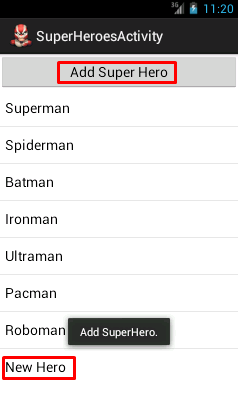
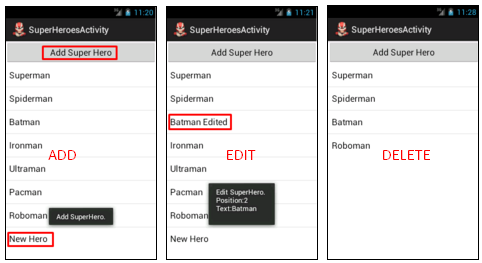
OUTCOME.

2) Edit Item

File: SuperHeroesActivity.java
package com.example.mysuperhero;
import java.util.ArrayList;
import java.util.Arrays;
import java.util.List;
import android.os.Bundle;
import android.app.Activity;
import android.view.Menu;
import android.view.View;
import android.view.View.OnClickListener;
import android.widget.AdapterView;
import android.widget.ArrayAdapter;
import android.widget.Button;
import android.widget.ListView;
import android.widget.TextView;
import android.widget.Toast;
public class SuperHeroesActivity extends Activity {
        Button btnAddSuperHero;
        ListView lvwSuperHeroes;
        String[] strSuperHeroes;
        ArrayAdapter adpSuperHeroes;
        
        @Override
        protected void onCreate(Bundle savedInstanceState) {
                super.onCreate(savedInstanceState);
                setContentView(R.layout.activity_super_heroes);
                setLvwSuperHeroes();
                setBtnAddSuperHero();
        }
        @Override
        public boolean onCreateOptionsMenu(Menu menu) {
                // Inflate the menu; this adds items to the action bar if it is present.
                getMenuInflater().inflate(R.menu.activity_super_heroes, menu);
                return true;
        }
         private void setLvwSuperHeroes(){
                 //bind object
        lvwSuperHeroes = (ListView) findViewById(R.id.lvw_superheroes);
               
        //Add new values to array
        strSuperHeroes =new String[] {"Superman","Spiderman","Batman","Ironman","Ultraman", "Pacman", "Roboman"};
               
        //Create ArrayList from strSuperHeroes
        List<String> values = new ArrayList<String>(Arrays.asList(strSuperHeroes));
               
        //Create Adapter to load ArrayList
        adpSuperHeroes = new ArrayAdapter<String>(this, android.R.layout.simple_list_item_1, values);
               
        //Plug adpSuperHeroes to lvwSUperHeroes
        lvwSuperHeroes.setAdapter(adpSuperHeroes);
               
        //set onclick listener for listview
        lvwSuperHeroes.setOnItemClickListener(new AdapterView.OnItemClickListener() {
            @Override
            public void onItemClick(AdapterView<?> parent, View view, int position, long id) {
                editSuperHero(position, ((TextView) view).getText().toString());
            }
                });
            }
                private void setBtnAddSuperHero() {
                        btnAddSuperHero = (Button) findViewById(R.id.btn_add_superhero);
                        btnAddSuperHero.setOnClickListener(new OnClickListener() {
                                @Override
                                public void onClick(View view) {
                                        addSuperHero();
                                }
                        });
                }
                private void editSuperHero(int position, String text){
                Toast.makeText(getApplicationContext(),"Edit SuperHero.\nPosition:"+position+"\nText:"+text+"\n",
                        Toast.LENGTH_SHORT).show();
                //recreate new superheroes string array
                String[] strNewSuperHeroes = new String[adpSuperHeroes.getCount()];
                    for (int i = 0; i < adpSuperHeroes.getCount(); i++) {
                        if (i != position) {
                            strNewSuperHeroes[i]= (String) adpSuperHeroes.getItem(i);
                        } else {
                            strNewSuperHeroes[i]= (String) adpSuperHeroes.getItem(i);
                            strNewSuperHeroes[i] += " Edited";
                        }
                    }
               
                //clear adapter
                adpSuperHeroes.clear();
               
                //reassign new superheroes string array to adapter
                adpSuperHeroes.addAll(strNewSuperHeroes);
               
                //notify apps that adapter has changed
                adpSuperHeroes.notifyDataSetChanged();
                //scroll to the bottom
                lvwSuperHeroes.smoothScrollToPosition(adpSuperHeroes.getCount() -1);               
            }
            private void addSuperHero(){
                Toast.makeText(getApplicationContext(),"Add SuperHero.",
                        Toast.LENGTH_SHORT).show();  
                adpSuperHeroes.add("New Hero");
                adpSuperHeroes.notifyDataSetChanged();
                //scroll to the bottom
                lvwSuperHeroes.smoothScrollToPosition(adpSuperHeroes.getCount() -1);
            }
}
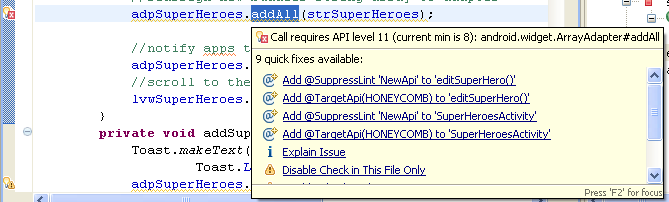
You may get error for using “addAll” method.
Error: Call requires API level 11
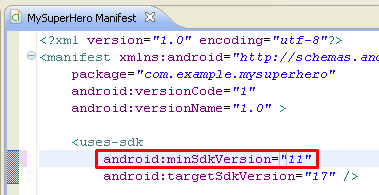
Solution: Edit AndroidManifest.xml and set minSdkVersion=11
 
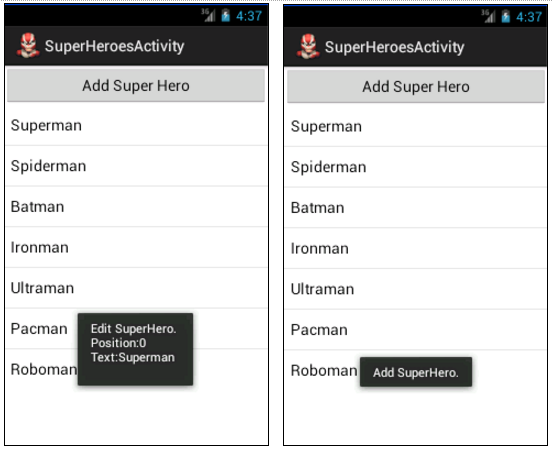
OUTCOME.

3) Delete Item

We use onItemLongClickListener to trigger the deleteSuperHero method
File: SuperHeroesActivity.java
package com.example.mysuperhero;
import java.util.ArrayList;
import java.util.Arrays;
import java.util.List;
import android.os.Bundle;
import android.app.Activity;
import android.view.Menu;
import android.view.View;
import android.view.View.OnClickListener;
import android.widget.AdapterView;
import android.widget.ArrayAdapter;
import android.widget.Button;
import android.widget.ListView;
import android.widget.TextView;
import android.widget.Toast;
public class SuperHeroesActivity extends Activity {
        Button btnAddSuperHero;
        ListView lvwSuperHeroes;
        String[] strSuperHeroes;
        ArrayAdapter adpSuperHeroes;
        
        @Override
        protected void onCreate(Bundle savedInstanceState) {
                super.onCreate(savedInstanceState);
                setContentView(R.layout.activity_super_heroes);
                setLvwSuperHeroes();
                setBtnAddSuperHero();
        }
        @Override
        public boolean onCreateOptionsMenu(Menu menu) {
                // Inflate the menu; this adds items to the action bar if it is present.
                getMenuInflater().inflate(R.menu.activity_super_heroes, menu);
                return true;
        }
         private void setLvwSuperHeroes(){
                 //bind object
        lvwSuperHeroes = (ListView) findViewById(R.id.lvw_superheroes);
               
        //Add new values to array
        strSuperHeroes =new String[] {"Superman","Spiderman","Batman","Ironman","Ultraman", "Pacman", "Roboman"};
               
        //Create ArrayList from strSuperHeroes
        List<String> values = new ArrayList<String>(Arrays.asList(strSuperHeroes));
               
        //Create Adapter to load ArrayList
        adpSuperHeroes = new ArrayAdapter<String>(this, android.R.layout.simple_list_item_1, values);
               
        //Plug adpSuperHeroes to lvwSUperHeroes
        lvwSuperHeroes.setAdapter(adpSuperHeroes);
               
        //set onclick listener for listview
        lvwSuperHeroes.setOnItemClickListener(new AdapterView.OnItemClickListener() {
            @Override
            public void onItemClick(AdapterView<?> parent, View view, int position, long id) {
                editSuperHero(position, ((TextView) view).getText().toString());
            }
                });
      //set onItemLongClickListener
        lvwSuperHeroes.setOnItemLongClickListener(new AdapterView.OnItemLongClickListener() {
            public boolean onItemLongClick(AdapterView<?> arg0, View v,
                    int index, long arg3) {
                    deleteSuperHero(index);
                    //Toast.makeText(MainActivity.this,lvwSuperHeroes.getItemAtPosition(index).toString(), Toast.LENGTH_LONG).show();
                return true;
            }
        });  
            }
                private void setBtnAddSuperHero() {
                        btnAddSuperHero = (Button) findViewById(R.id.btn_add_superhero);
                        btnAddSuperHero.setOnClickListener(new OnClickListener() {
                                @Override
                                public void onClick(View view) {
                                        addSuperHero();
                                }
                        });
                }
                private void editSuperHero(int position, String text){
                Toast.makeText(getApplicationContext(),"Edit SuperHero.\nPosition:"+position+"\nText:"+text+"\n",
                        Toast.LENGTH_SHORT).show();
                //recreate new superheroes string array
                String[] strNewSuperHeroes = new String[adpSuperHeroes.getCount()];
                    for (int i = 0; i < adpSuperHeroes.getCount(); i++) {
                        if (i != position) {
                            strNewSuperHeroes[i]= (String) adpSuperHeroes.getItem(i);
                        } else {
                            strNewSuperHeroes[i]= (String) adpSuperHeroes.getItem(i);
                            strNewSuperHeroes[i] += " Edited";
                        }
                    }
               
                //clear adapter
                adpSuperHeroes.clear();
               
                //reassign new superheroes string array to adapter
                adpSuperHeroes.addAll(strNewSuperHeroes);
               
                //notify apps that adapter has changed
                adpSuperHeroes.notifyDataSetChanged();
                //scroll to the bottom
                lvwSuperHeroes.smoothScrollToPosition(adpSuperHeroes.getCount() -1);                
            }
            private void addSuperHero(){
                Toast.makeText(getApplicationContext(),"Add SuperHero.",
                        Toast.LENGTH_SHORT).show();  
                adpSuperHeroes.add("New Hero");
                adpSuperHeroes.notifyDataSetChanged();
                //scroll to the bottom
                lvwSuperHeroes.smoothScrollToPosition(adpSuperHeroes.getCount() -1);
            }
            private void deleteSuperHero(int position){
            adpSuperHeroes.remove(adpSuperHeroes.getItem(position));
            adpSuperHeroes.notifyDataSetChanged();
    }
}
OUTCOME.
Ironman, Ultraman and Pacman has been removed from the list

DOWNLOAD


.

102 MySuperHero Android ListView - Static and Dynamic


.
102 MySuperHero Android ListView - Static and Dynamic
We are going to add a list of Super Heroes to the SuperHeroesActivity
First, we will use a static list. Static list uses a simple XML resource file.
Then, we will change to dynamic list. Dynamic list requires the use of adapter.

0) Starting Up

1) Static List

1.1) Prepare List Resource

File: res/values/strings.xml
<?xml version="1.0" encoding="utf-8"?>
<resources>
    <string name="app_name">MySuperHero</string>
    <string name="hello_world">Hello world!</string>
    <string name="menu_settings">Settings</string>
    <string name="title_activity_super_heroes">SuperHeroesActivity</string>
    <string-array name="superheroes_array">
        <item>Superman</item>
        <item>Spiderman</item>
        <item>Batman</item>
        <item>Ironman</item>
        <item>Ultraman</item>
        <item>Pacman</item>
        <item>Roboman</item>
    </string-array>
</resources>

1.2) Edit SuperHeroes Layout

Replace the default codes with the below codes.
File: res/layout/activity_super_heroes.xml
<?xml version="1.0" encoding="utf-8"?>    
<LinearLayout xmlns:android="http://schemas.android.com/apk/res/android"
    android:layout_width="fill_parent"
    android:layout_height="wrap_content"
    android:orientation="vertical" >
        <Button
            android:id="@+id/btn_add_superhero"
            android:layout_width="fill_parent"
            android:layout_height="match_parent"
            android:text="Add Super Hero" />
<ListView    
    android:id="@+id/lvw_superheroes"
    android:layout_width="fill_parent"    
    android:layout_height="wrap_content"    
    android:entries="@array/superheroes_array"
    />    
</LinearLayout>    
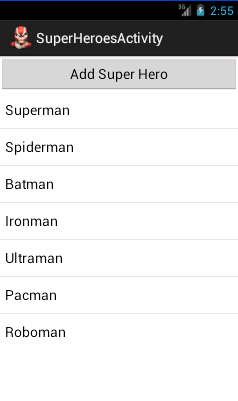
OUTCOME.
Static List cannot be modified.
In order to make the list editable, we need to change the codes to adapter object.

2) Dynamic List

We are going to add codes to make the list dynamic.
The codes may look complicated and confusing.
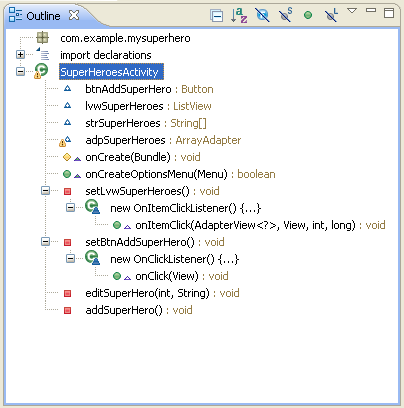
The Outline screenshot below may help you understand how these codes are structured.
  • First we declare four class members; btnAddSuperHero, lvwSuperHeroes, strSuperHeroes and adpSuperHeroes.
  • In onCreate method, we have method calls setLvwSuperHeroes and setBtnAddSuperHero
  • setLvwSuperHeroes adds list item and registers onClick that will call editSuperHero method when the list is clicked.
  • setBtnAddSuperhero registers onClick that will call addSuperHero method when the button is clicked.

2.1) Edit Controller

File: SuperHeroesActivity.java
package com.example.mysuperhero;
import java.util.ArrayList;
import java.util.Arrays;
import java.util.List;
import android.os.Bundle;
import android.app.Activity;
import android.view.Menu;
import android.view.View;
import android.view.View.OnClickListener;
import android.widget.AdapterView;
import android.widget.ArrayAdapter;
import android.widget.Button;
import android.widget.ListView;
import android.widget.TextView;
import android.widget.Toast;
public class SuperHeroesActivity extends Activity {
        Button btnAddSuperHero;
        ListView lvwSuperHeroes;
        String[] strSuperHeroes;
        ArrayAdapter adpSuperHeroes;
        
        @Override
        protected void onCreate(Bundle savedInstanceState) {
                super.onCreate(savedInstanceState);
                setContentView(R.layout.activity_super_heroes);
                setLvwSuperHeroes();
                setBtnAddSuperHero();
        }
        @Override
        public boolean onCreateOptionsMenu(Menu menu) {
                // Inflate the menu; this adds items to the action bar if it is present.
                getMenuInflater().inflate(R.menu.activity_super_heroes, menu);
                return true;
        }
         private void setLvwSuperHeroes(){
                 //bind object
        lvwSuperHeroes = (ListView) findViewById(R.id.lvw_superheroes);
               
        //Add new values to array
        strSuperHeroes =new String[] {"Superman","Spiderman","Batman","Ironman","Ultraman", "Pacman", "Roboman"};
               
        //Create ArrayList from strBuddies
        List<String> values = new ArrayList<String>(Arrays.asList(strSuperHeroes));
               
        //Create Adapter to load ArrayList
        adpSuperHeroes = new ArrayAdapter<String>(this, android.R.layout.simple_list_item_1, values);
               
        //Plug adpSuperHeroes to lvwSUperHeroes
        lvwSuperHeroes.setAdapter(adpSuperHeroes);
               
        //set onclick listener for listview
        lvwSuperHeroes.setOnItemClickListener(new AdapterView.OnItemClickListener() {
            @Override
            public void onItemClick(AdapterView<?> parent, View view, int position, long id) {
                editSuperHero(position, ((TextView) view).getText().toString());
            }
                });
            }
                private void setBtnAddSuperHero() {
                        btnAddSuperHero = (Button) findViewById(R.id.btn_add_superhero);
                        btnAddSuperHero.setOnClickListener(new OnClickListener() {
                                @Override
                                public void onClick(View view) {
                                        addSuperHero();
                                }
                        });
                }
                private void editSuperHero(int position, String text){
                Toast.makeText(getApplicationContext(),"Edit SuperHero.\nPosition:"+position+"\nText:"+text+"\n",
                        Toast.LENGTH_SHORT).show();        
            }
            private void addSuperHero(){
                Toast.makeText(getApplicationContext(),"Add SuperHero.",
                        Toast.LENGTH_SHORT).show();        
            }
}
OUTCOME.
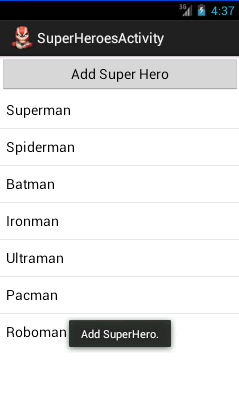
When the user clicks the list item, e.g. Superman, the apps will throw a toast displaying the text “Edit SuperHero” and the list item position and its text value.
When the user clicks the Add Super Hero button, the apps throws a toast displaying the text “Add SuperHero”.
Since we do not use the string resources anymore, it is safe to delete the entries attribute in the layout and the corresponding string values.
File: res/layout/activity_super_heroes.xml

<?xml version="1.0" encoding="utf-8"?>    
<LinearLayout xmlns:android="http://schemas.android.com/apk/res/android"
    android:layout_width="fill_parent"
    android:layout_height="wrap_content"
    android:orientation="vertical" >
        <Button
            android:id="@+id/btn_add_superhero"
            android:layout_width="fill_parent"
            android:layout_height="match_parent"
            android:text="Add Super Hero" />
<ListView    
    android:id="@+id/lvw_superheroes"
    android:layout_width="fill_parent"    
    android:layout_height="wrap_content"    
    android:entries="@array/superheroes_array"
    />    
</LinearLayout>    
File: res/values/strings.xml

<?xml version="1.0" encoding="utf-8"?>
<resources>
    <string name="app_name">MySuperHero</string>
    <string name="hello_world">Hello world!</string>
    <string name="menu_settings">Settings</string>
    <string name="title_activity_super_heroes">SuperHeroesActivity</string>
    <string-array name="superheroes_array">
        <item>Superman</item>
        <item>Spiderman</item>
        <item>Batman</item>
        <item>Ironman</item>
        <item>Ultraman</item>
        <item>Pacman</item>
        <item>Roboman</item>
    </string-array>
</resources>

DOWNLOAD:


.